Identify the number before correcting it
A project can contain a novel, excluded scenes, notes, character sheets and research. “Too many words” is not yet a diagnosis: establish which set the open panel measures. A selection total can be correct while differing from the manuscript.
Record where the number appeared and which file or folder was selected. Specify whether you need one scene, compilation text or today’s work. Session progress is not final length. Check for different scopes before reorganizing or deleting material.
Documents and selections have different scopes
The publisher documents editor-footer counts and views for documents and selections. When several texts are open, the figure can describe the group rather than the paragraph containing the cursor.
Test a short scene alone, then add another to the selection and observe the increase. Intentional scope expansion does not duplicate prose. Options vary by platform and version; use matching documentation when menus differ. The measure’s name and selected documents must correspond to the intended text.
Check compilation as well as statistics
Open Project > Statistics, then use Compiled or Selected Documents for the intended scope. These are the English labels shown in the publisher’s guide; translated labels can differ.
Project statistics provide more detail than a single-document total. Official guidance distinguishes compiled-document and selection counts and describes inclusions, including notes. List expected output components. An alternative scene in the Binder does not automatically belong to delivery.
Compile a checking copy and inspect contents or section order. Find every expected chapter’s opening and closing sentence. A missing chapter and accidentally included appendix could offset numerically while producing the wrong document, so total agreement is insufficient.
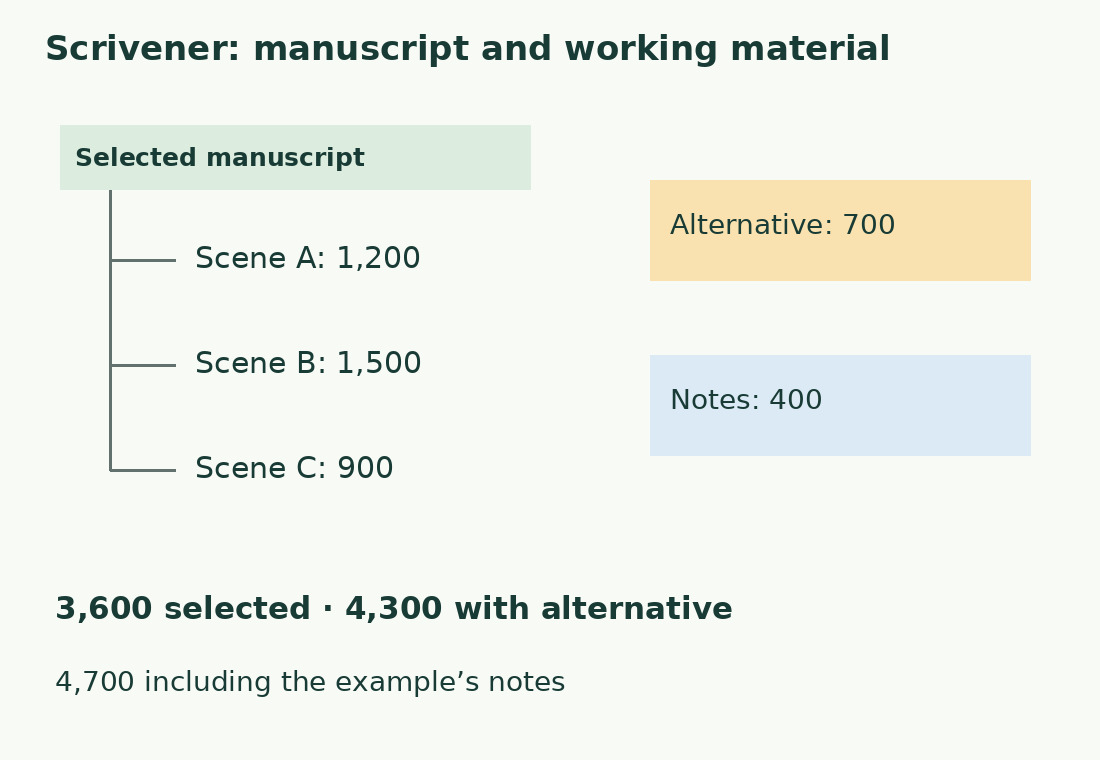
An invented project explains subtotals
Three scenes of 1,200, 1,500 and 900 words form a selected 3,600-word manuscript. Add an alternative scene of 700 for 4,300; add 400 words of notes for 4,700 overall.
This illustrates organization, not an interface test. Use 3,600 for that delivery; 4,300 might help plan revision of all narrative material. Make your own table with an inclusion column. If the program differs from the expected sum, inspect listed components before individual-word recognition rules.
Project and session targets serve different purposes
Open Project > Show Project Targets to set project and session goals. For one document, use the bullseye icon in the editor footer.
Scrivener offers project, session and document targets; official help explains their locations. They need not agree. Project targets concern planned manuscript length, session targets track a period of work, and document targets allocate approximate scene space.
None replaces reading or determines universal novel length. For cutting, record starting and desired final totals. A progress bar intended to grow can be unintuitive during reduction; compare the document’s two counts independently of that display.
Words written differ from net growth
Start at 3,600, add 500 and delete 300: final length is 3,800 and net growth 200. You still wrote 500 new words and performed deletion work. These are distinct facts.
Use final length for delivery; track additions and cuts separately for personal progress if useful. A small net change need not mean an unproductive session. If a panel surprises you, check settings and measurement start time. Identify whether you need current length, revision difference or writing activity before changing text to raise an indicator.
Words, estimated pages and cartelle are different units
An estimate based on words per page does not establish final pages with chosen fonts, margins and layout. Keep word totals for design-independent comparisons.
An Italian brief expressed in cartelle requires characters within the agreed scope. Use the final text in the cartella calculator with the required size. Converting words to pages and then cartelle adds unnecessary assumptions. Our external word counter isolates a scene but does not open Scrivener projects; it measures pasted text or supported exports.
A final check in four steps
- Save an identifiable project version.
- Check files included in the delivery compilation.
- Inspect opening, closing and supplementary output sections.
- Record total, unit and inclusion rules for that version.
Export exactly the same text for another-editor comparison. Added titles, notes and excluded components can matter more than segmentation. Do not round to pass a requirement or call a generic software count certified. The recipient’s rules define valid scope; make that scope verifiable.
Keep a useful revision summary
Per chapter, record previous and current counts and a brief reason such as “scene added” or “alternative removed.” You need not log each sentence. Investigate unexpected local changes before recounting the Binder.
Uniform increases may indicate a newly included component; a difference concentrated in one chapter calls for targeted checking. Keep the routine light: consistent units, scope and identifiable versions. Counting supports revision and prevents surprises without making organization a second job.
Three sums answer three questions
| Selected content | Example calculation | Words |
|---|---|---|
| Selected manuscript | 1,200 + 1,500 + 900 | 3,600 |
| Alternative scene also included | 3,600 + 700 | 4,300 |
| All example material | 4,300 + 400 of notes | 4,700 |
Sources and checks
- Literature & Latte, 7 Ways to View Word Counts in Scrivener Projects · Multiple document and project count views.
- Literature & Latte, Track Statistics and Targets in Your Scrivener Projects · Statistics, selections and project/session/document targets.