Identify which Outlook you are using
Applications bearing the same Outlook name can offer different commands. Classic Windows instructions do not establish feature availability in new Outlook. Before searching for a missing tab, identify the application and ensure you are composing a message, not merely viewing the mailbox.
Do not change the email to make an unavailable command appear. For an occasional check, copy the relevant passage to Word or the word counter. That result describes the selected copy under the chosen method. Exclude unnecessary confidential information and respect the workplace environment required for the material.
Open the count in the composition window
Create a message or open Reply, Reply All or Forward, then follow the classic route above. The panel includes character and paragraph statistics as well as words. Read the requested metric: a word total does not prove compliance with a 500-character limit including spaces.
For editorial requirements, establish whether the subject has a separate ceiling. The documented feature concerns the body. If measuring an external copy, compare its beginning and end with the email: an incomplete selection can omit the final request or include the signature. A precise total for the wrong passage is still the wrong measurement.
Separate signature and quoted conversation
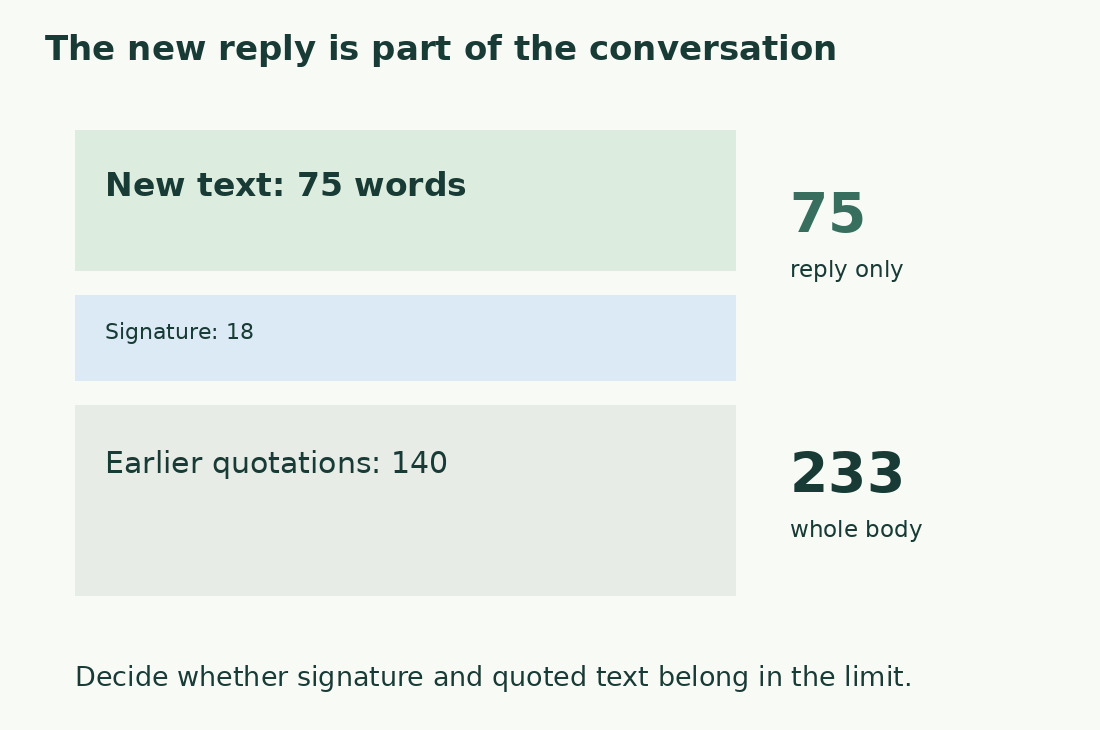
A short reply can sit above a long quoted exchange. To evaluate what you wrote, separate the new contribution from earlier material instead of assuming a body total describes the reply.
In an original example, 75 new words, an 18-word signature and 140 quoted words total 233 under one counting rule. For a 120-word limit on new text, 75 is relevant; a limit on the entire body is different. Do not delete conversation history merely to measure the reply. Work on a counting copy, then preserve the context the recipient needs in the actual email.
Measure the subject on its own
The subject is a separate field. Copy it alone to count its characters and specify whether spaces count. Do not automatically add subject characters to body words: the units and purpose differ.
Retain the reference, date or action that distinguishes the message. Indiscriminate shortening can make an inbox harder to use. A character threshold does not promise identical preview display on every device or interface. For an important message, inspect a realistic destination view as well as its numerical length.
Check links, images and pasted content
A link’s displayed label can be much shorter than its destination. An image can carry words absent from plain-text copying. Define whether you are measuring readable email content or a technical representation, then inventory essential elements separately.
A deadline shown only in an image is still information even if the body count omits it. Do not assume optical recognition by the counting command. After an external check, return to the actual email. If you revised the copy, transfer the change deliberately and inspect formatting, links and the final request before sending.
Shorten the new text while preserving the request
Identify why you are writing and what the recipient must do. A request for confirmation needs the item to confirm and any real deadline. Removing those to meet a number makes the email shorter but less useful.
Then inspect repeated openings and endings, context already known and detail available in an accessible attachment. Avoid ambiguous abbreviations merely to save characters. Read the new passage without the history and restore any missing actor, decision or deadline. The Italian Gulpease check is an indicator for Italian text, not a verifier of complete requests.
Check the actual final message
Measure the final passage again after applying a limit and confirm the original inclusion rule. A different signature or new quoted text can alter the whole-body result. When sharing the count, label it, for example “new text; signature and quotes excluded”. Record version and method for a formal delivery requirement.
There is no need to reach a predetermined length when none is required. The count helps enforce a constraint or spot an oversized response. The decisive review is whether the recipient can understand the message, find cited attachments and take the requested action without asking for missing information.
A short reply inside a long conversation
| Body component | Words in this example | Use of the result |
|---|---|---|
| New text | 75 | Length of the new reply |
| Signature | 18 | Include only when required |
| Earlier quotations | 140 | Existing conversation context |
| Whole body | 233 | Different from new text alone |
Sources and checks
- Microsoft: Count words in an email · Classic message-window route, body statistics and new Outlook limitation.