Distinguish cell totals from output length
Adding independent cell lengths answers how much text the cells contain. An export joining them with commas, semicolons, spaces or line breaks also contains those separators. A correct cell total can therefore accompany an over-limit final block.
Decide first whether values remain separate or are joined, whether empty rows are ignored and whether a trailing delimiter is included. These choices define the serialized text, not adjustments to make after discovering it is too long.
Use an auditable helper column
For text in A2:A100, enter =LEN(A2) in B2, fill through B100 and put =SUM(B2:B100) outside that range. This exposes each row’s contribution. Exclude headings such as “Description”, intermediate totals, comments and service formulas unless required.
Microsoft documents combining SUM and LEN. Newer versions support some direct range formulas, but a helper column is easy to inspect and share; the shortest formula is not necessarily clearest.
Three values, two boundaries
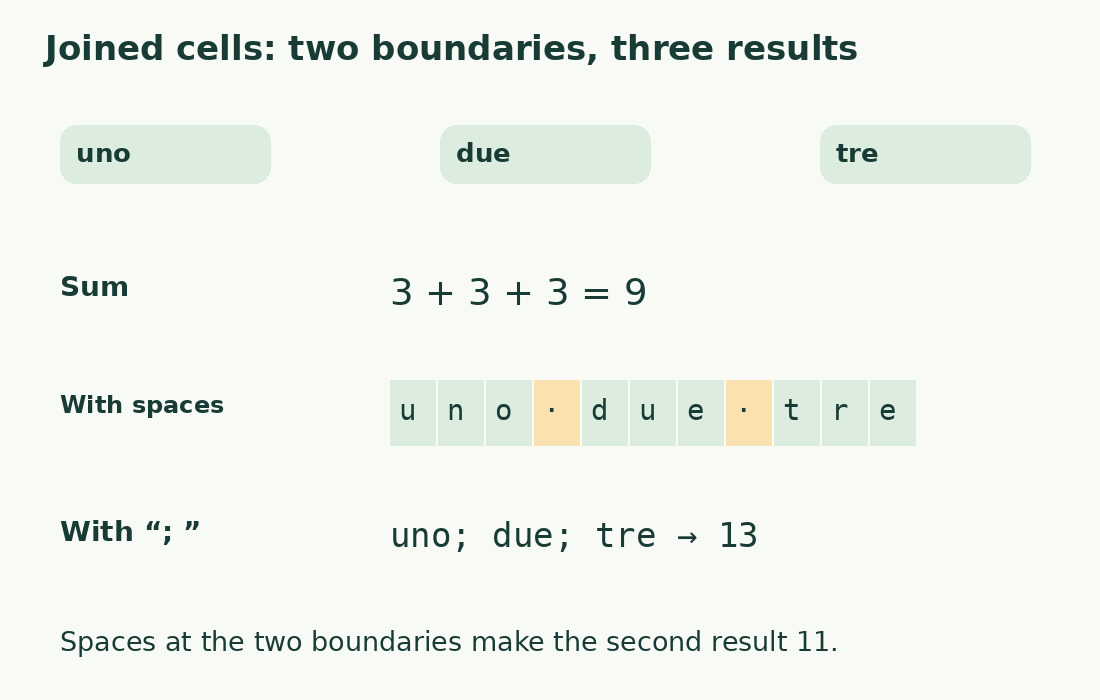
Keep the literal samples uno, due and tre: each has three characters, total nine. uno due tre has 11 after adding two spaces. With ; between values, uno; due; tre has 13.
For n exported nonempty items without a final delimiter, there are n−1 separators. Count actual included items, not worksheet rows. Joining 100 descriptions with comma plus space adds 198 separator characters. Measuring the finished string remains the most direct check.
Define filtered, blank and service rows
Hiding or filtering rows does not automatically make every formula exclude them; an ordinary SUM still refers to its range. Use a visible inclusion flag, such as 1 for included and 0 for excluded, and an effective length per row. Check a small sample before complex formulas.
A space is content while an empty string adds no characters. Ignoring space-only values introduces a cleaning rule: retain the original and the actual calculation text in separate columns.
Find anomalous contributions
Sort or filter lengths only while keeping identifier and text associated. A long row may contain accidental pasted text, duplication or many spaces, but could also be legitimate. Check the range, then subtotals in groups of 10 or 20 to isolate discrepancies; do not subtract manually.
Compare before and after export. Quotes, delimiters and escape characters may add serialization overhead. Establish whether the limit concerns readable text or encoded output; character totals are not file bytes.
Measure the destination representation
Build and count the actual joined string. Identical values joined with or without spaces after commas yield different lengths. For ordinary text, compare in the character counter, noting that its character metric excludes line breaks while an actual break in an Excel string can count.
Keep separate columns or totals labeled “value characters” and “joined-text characters”, and document break treatment. A well-defined measurement matters more than formula complexity.
Empty fields alter delimiters too
With four cells containing “uno”, empty, “due”, “tre”, value lengths still sum to nine. Ignoring the empty cell gives two boundaries; retaining an empty exported field adds a position and delimiter. Follow the destination format.
Before thousands of rows, test a normal item, empty item and item already containing the delimiter, which may need quoting. Serialization cost need not be constant per row. Preserve stable identifiers: a smaller total could mean a required description disappeared.
Same values, three valid totals
| Measured object | Text | Characters |
|---|---|---|
| Cell-length sum | uno + due + tre | 9 |
| Joined with spaces | uno due tre | 11 |
| Joined with semicolon and space | uno; due; tre | 13 |
Sources and checks
- Microsoft: Count cell characters · Per-cell lengths and sums across a range.