Wrapping is not a stored newline
A narrow column can wrap one string onto several displayed lines without adding characters. Widening it changes the appearance, not its stored structure. Actual breaks can come from imports, formulas or typing. Inspect the string and count controls instead of inferring breaks from row height. This distinction matters when exporting one-line descriptions or measuring a character limit.
Count LF with an exact sample
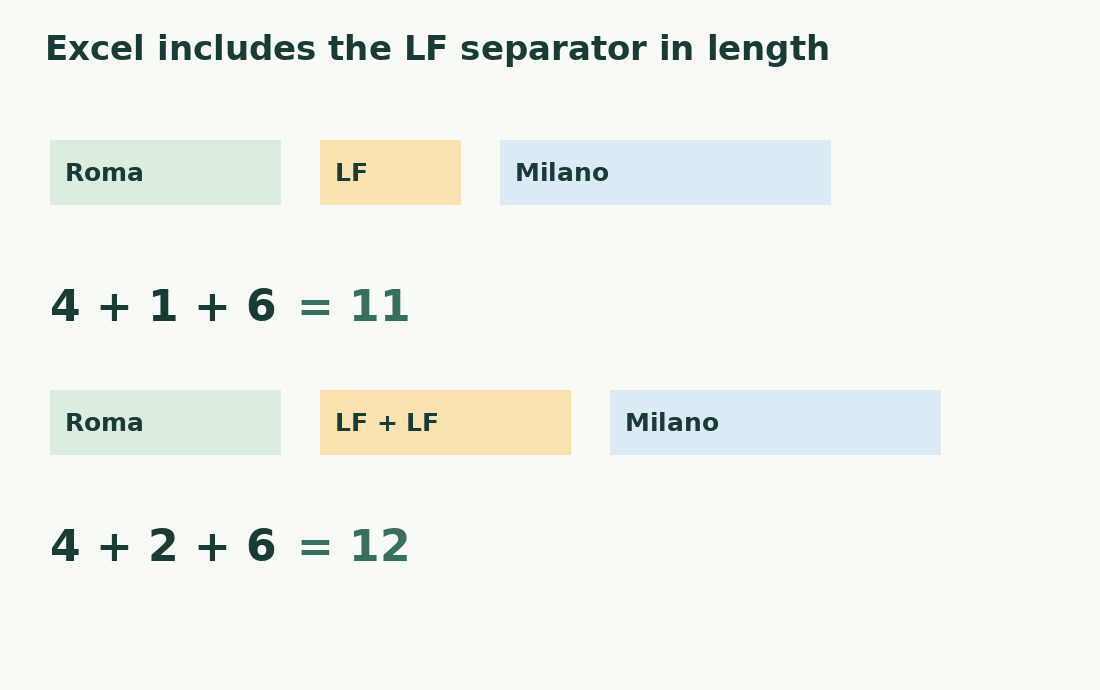
Use =LEN(A2)-LEN(SUBSTITUTE(A2,CHAR(10),"")) to count line-feed characters. Build a controlled sample with ="Roma"&CHAR(10)&"Milano": four letters plus one LF plus six letters equals 11 characters and one LF. With two LF characters the length is 12 and the LF count two. The empty visual line is an effect of the second break, not another word.
Normalize CRLF in the right order
Imported CRLF contains CR 13 followed by LF 10. Counting LF identifies each pair once, while the original length includes both characters. Normalize pairs to one LF first, then convert any remaining standalone CR to LF if the format requires it. Reversing that order can create two breaks from one pair. Do not remove CR globally without checking whether standalone CR carries a boundary.
Segments equal breaks plus one, with conditions
For nonempty text using only LF separators, segments equal LF count plus one. One LF between the cities gives two segments; two LF gives three, including an empty middle segment. Handle an empty cell separately if it means zero content lines. A final LF creates a final empty segment. Decide whether those empty positions count; segments are not automatically paragraphs or completed list entries.
Replace with a space when flattening prose
After handling CR, use =SUBSTITUTE(A2,CHAR(10)," ") for a one-line phrase. Roma Milano remains 11 characters because one character replaces another. Removing LF instead creates RomaMilano, length 10, losing the word boundary. That may suit a specifically broken code but not ordinary prose. Apply TRIM afterwards only when repeated spaces are irrelevant; preserve structural spacing otherwise.
Review each affected record
Keep each record’s ID, LF count and original length together. A high break count may be a legitimate technical list, not an error. Check whether the destination supports paragraphs or needs an edited one-line description with suitable punctuation. After export inspect a record with breaks and one without, checking real stored separators rather than a preview’s line wrapping.
Align the metric before comparing counters
Excel LEN includes stored LF. Another counter may exclude breaks from a particular editorial metric. Align text, newline format and declared unit before comparison; see the character counter and its method. A discrepancy equal to the break count is a clue, not proof: pasted spaces or omissions may coexist. Label the record “LF characters” or “segments after normalization” rather than ambiguous “lines”.
Roma and Milano: structure and length
| Content | LF characters | Length |
|---|---|---|
| Roma + LF + Milano | 1 | 11 |
| Roma + LF + LF + Milano | 2 | 12 |
| Roma Milano | 0 | 11 |
| RomaMilano | 0 | 10 |
Sources and checks
- Microsoft: CHAR · Character creation, including supported codes 9, 10 and 13.
- Microsoft: SUBSTITUTE · Targeted replacements and optional occurrence selection.
- Microsoft: LEN · Text length, spaces and compatibility-specific Unicode behavior.