Define the final string
A catalogue may store product name, variant and description separately while publication requires one line. Write a complete target example with its punctuation and spacing before constructing formulas. Decide whether an absent optional value removes its label or leaves a placeholder. A source-component total measures a different object from the message that will be published.
Join two fields with a stated separator
With fields in A2 and B2, =A2&" "&B2 adds one space; =A2&" - "&B2 adds three characters. Put the output in C2 and =LEN(C2) in D2. The quoted separator is actual output, not spreadsheet decoration. Read C2 before trusting D2: a plausible length can describe reversed or missing fields.
Check the arithmetic
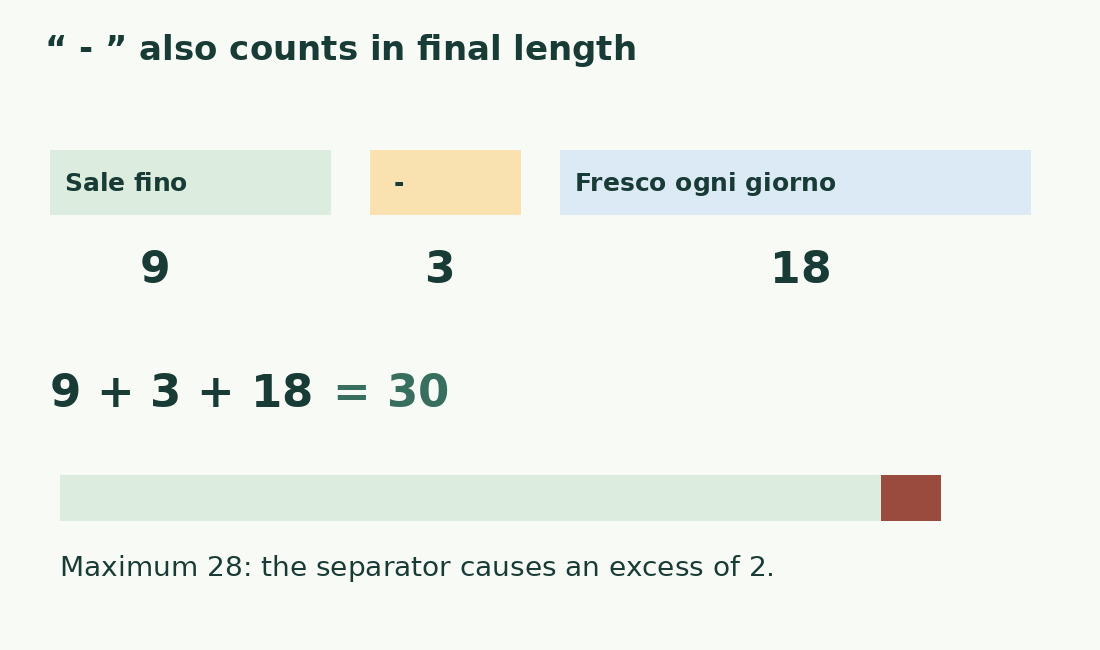
Keep the literal Italian samples: Sale fino has 9 characters and Fresco ogni giorno has 18, totaling 27. Joining with - produces Sale fino - Fresco ogni giorno, length 30. At a maximum of 28, the component sum passes but the output exceeds by 2. The difference comes from the added separator, not a LEN error.
Handle empty fields explicitly
For one space only when both fields exist, use =IF(A2="",B2,IF(B2="",A2,A2&" "&B2)). It returns the second field if the first is empty, the first if the second is empty, and empty output if both are empty. A cell containing spaces is not an empty string. Prepare questionable source fields separately; see hidden-space cleanup.
Treat optional labels as blocks
A prefix such as Code: may belong only when its value exists. Keep label and value in one conditional block rather than removing a fixed number of trailing characters afterward. For more fields, list the combinations actually permitted by the dataset. Use helper columns when logic becomes hard to inspect; formula brevity matters less than predictable output.
Control numbers, dates and identifiers
Specify the text representation required for dates, units and codes with leading zeros. A visual cell format does not reliably specify a concatenated message. Preserve numeric values needed by calculations and prepare their publication strings separately. Test shortest, longest and missing values. LEN measures the resulting text; it cannot establish whether a date or quantity describes the right item.
Test each formula branch
Prepare four cases: both fields present, only first, only second and neither. Check exact output, absence of added edge spaces and length. If you change the separator from one character to three, update expected results. Make the limit check reference the new output. A near-threshold row exposes references that still point to an older source column.
Export the column you measured
Identify the exact column copied, downloaded or read by another system. Measuring C does not control output independently rebuilt from A and B elsewhere. After transfer compare representative rows, including an optional-field case and one near the maximum. Use the character counter for a single final string. Label component totals separately from completed-output length; both can be correct for different questions.
Components and completed output
| Component | Characters | Contribution |
|---|---|---|
| Sale fino | 9 | First field |
| Fresco ogni giorno | 18 | Second field |
| Component total | 27 | No added separator |
| - | 3 | Space, hyphen, space |
| Final output | 30 | 2 above maximum 28 |
Sources and checks
- Google Sheets: Primary documentation · Documented commands, function definitions and limitations used in this guide; workflow examples are original.
- Google Sheets: Primary documentation · Documented commands, function definitions and limitations used in this guide; workflow examples are original.