Start with the unexpected difference
Create original, working-output and transformation-note columns, with a stable record ID. An unexpected LEN result suggests extra data but does not identify its cause. Leading spaces, repeated separators and meaningful line breaks can look similar in a narrow cell. Inspect a short sample’s beginning, end and boundaries before choosing a rule; do not assume a new import has yesterday’s problem.
Normalize ordinary spaces
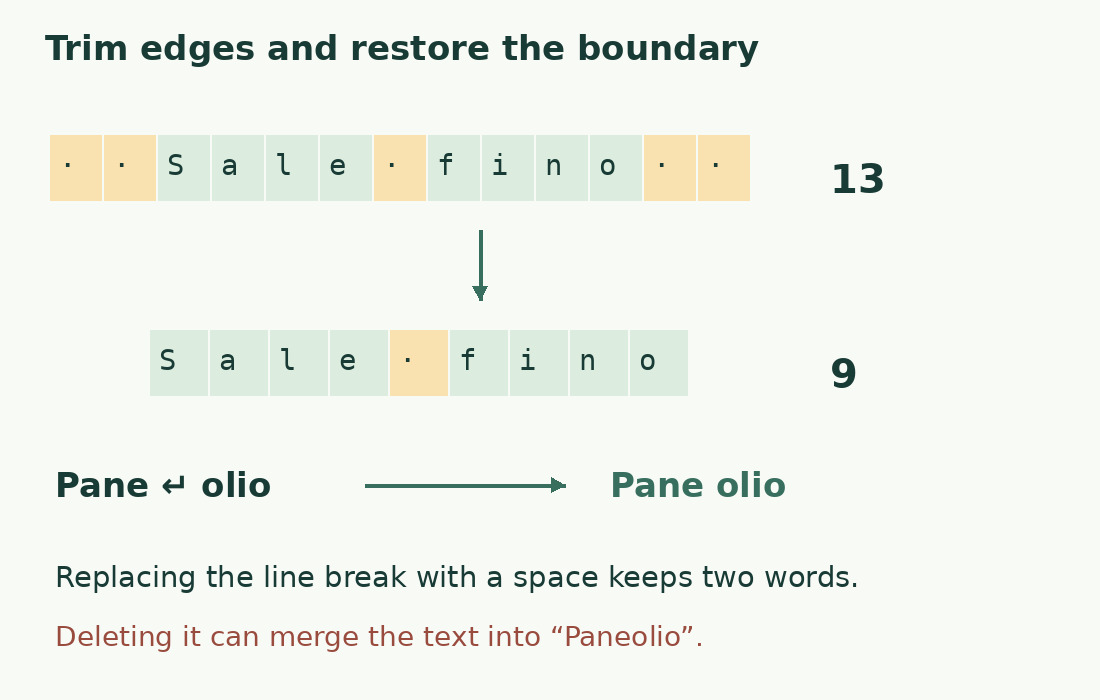
Use =TRIM(A2) in a helper cell. It removes ordinary edge spaces and reduces repeated internal spaces to one. The literal Sale fino has 13 characters and becomes Sale fino, with 9. Sale fino falls from 10 to 9. This is normalization, not a promise to remove every whitespace character. Preserve intentional alignment in technical data unless its specification allows a change.
Preserve a word boundary before cleaning
A cell containing Pane, a line break and olio has 9 characters. Removing the break gives Paneolio, with 8; replacing it with a space gives Pane olio, with 9. If tabs and common line breaks should separate words, prepare =REGEXREPLACE(A2,"[\t\r\n]+"," "), then apply TRIM. Keep real multiline structure in addresses or records when the destination needs it.
Know what CLEAN can remove
CLEAN targets nonprinting ASCII characters; it does not identify or remove every nonprinting Unicode character. Decide the fate of tabs and line boundaries first: removing a control character may join words. A lower length does not prove a better result. If a difference remains, identify the actual character before adding broader cleanup. Name the column for the transformation performed, rather than claiming it is free of every invisible character.
Replace an identified character deliberately
Use SUBSTITUTE with the exact identified target and an explicit replacement. Removal, conversion to an ordinary space and preservation are different decisions. A nonbreaking space may need conversion, while a meaningful joiner or punctuation mark may need to remain. Keep a before-and-after sample and a note of the rule. Similar appearance is insufficient evidence that two characters are interchangeable; names and technical identifiers deserve particular care.
Compare text as well as three lengths
Retain original, intermediate transformation and final output side by side. Equal length does not imply equal text: casa and cosa both have four characters. If four positions disappear, account for the actual changes in a short sample. For a large list inspect unusual differences and sensitive records, and describe any sampling honestly. Do not treat a successful first row as proof that every row is correct.
Replace source values only after checking dependencies
A separate output column may be clearest in a shared sheet. Before consolidating values, preserve an identifiable original and check formulas or exports that still read it. Give raw and cleaned columns different names. Check known rows and the end of the range after filling formulas; a half-filled helper column creates mixed rules. Cleaning a copy cannot improve publication if the export continues to use the original.
Check the limit after checking the meaning
Accidental spaces may push a description over its limit, but cleanup must not hide missing boundaries or alter the requirement. Re-read the final output, then measure it against the specified unit and inclusions. Use the character counter for a single final string and the Sheets limit check for row thresholds. A shorter string can still be incomplete or unsuitable.
Four outcomes from explicit cleanup rules
| Literal sample | Operation | Result |
|---|---|---|
| Sale fino | Normalize ordinary spaces | 13 → 9 characters |
| Sale fino | Reduce repeated internal space | 10 → 9 characters |
| Pane + line break + olio | Remove the boundary | Paneolio: 8 |
| Pane + line break + olio | Replace boundary with space | Pane olio: 9 |
Sources and checks
- Google: TRIM · Ordinary-space normalization; other whitespace and NBSP are excluded.
- Google: CLEAN · Removes nonprinting ASCII characters, not every Unicode invisible.
- Google: REGEXREPLACE · RE2 replacements for explicitly specified separators.