Define what the formula counts
For short descriptions, treating each space-separated unit as a word may suffice: the literal Italian Pane e olio has three, sale-fino one. This is a spreadsheet convention, not a universal definition of Italian words. Use the recipient’s required method as final reference. Test actual tabs, line breaks, unusual spaces and isolated punctuation from your data before applying the formula widely; avoid complexity for merely theoretical cases.
Separate normalization and counting
With source text in A2, enter =TRIM(A2) in B2. In C2 use =IF(B2="",0,LEN(B2)-LEN(SUBSTITUTE(B2," ",""))+1). The length difference counts spaces; one separator between adjacent units gives spaces plus one. The empty-string condition prevents inventing a word from zero spaces. Inspect the intermediate text. Function language and argument separators depend on settings; validate a small sample before filling down.
Handle tabs and line breaks explicitly
To make ordinary spaces, tabs and line breaks separate words, prepare B2 with =TRIM(REGEXREPLACE(A2,"[ \t\r\n]+"," ")), then count B2 as above. This explicit class collapses those separators into one space. Google documents RE2 with limitations for Unicode classes: the formula does not recognize every invisible character. Inspect web-imported separators individually, decide replacements and retain A2 to check that normalization preserved meaningful distinctions.
Check five predictable cases
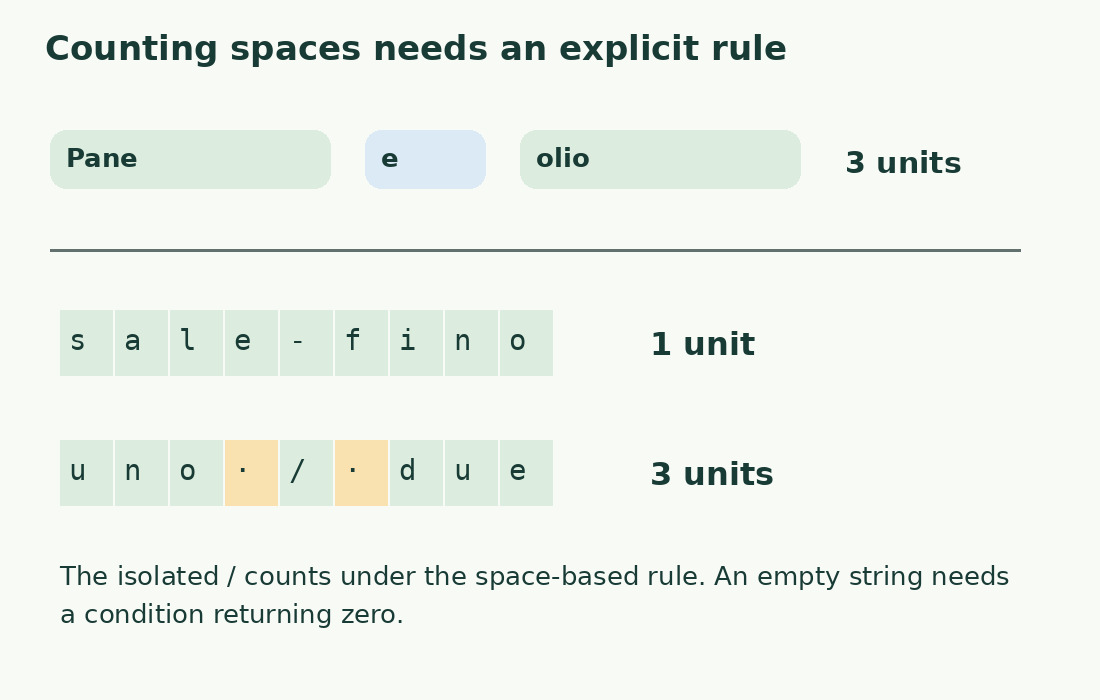
Under this rule, Pane e olio returns 3; Pane e olio also returns 3 after normalization; empty text returns 0; sale-fino returns 1; uno / due returns 3, including the isolated slash. If the assignment excludes that slash as a word, add and verify a suitable rule or use a counter with a documented criterion. Do not silently replace the result with an estimate or an opaque uncheckable formula.
Sum rows without inventing boundaries
For C2:C50 counts, use =SUM(C2:C50). Independent descriptions suit row counts; if a word continues across rows, reconstruct the text first. Exclude headings, summaries and working notes unless intended. Identify data rows with stable IDs rather than positions alone. After adding rows, check both the actual last row and presence of helper formulas: an unexpectedly low total may be an incomplete range, not a tokenization problem.
Keep language choices explicit
The rule keeps l'acqua, 2026 and blu-verde as single units without judging whether they are a word, number or linked pair. This can serve internal size checks but does not certify equivalence to a word processor. Compare problematic tokens individually when tools differ, especially URLs, abbreviations and hyphens. Do not alter meaning merely to align algorithms; keep the mandated acceptance method and use the sheet to organize revision.
Diagnose formulas from the intermediate step
Check straight versus typographic quotes, argument separators and function names for syntax errors. An always-one result suggests missing blank handling or a wrong normalized-column reference; an inflated count suggests remaining repeated spaces or isolated symbols. Do not apply fixed subtractions. Read A2, inspect B2 and manually count separators before inspecting C2. Fix normalization at its source and annotate the convention, for example “space-separated units; tabs and line breaks converted to spaces”.
Choose the right tool for the task
A sheet helps compare many rows and maintain an updateable breakdown; the word counter may be faster for one prose article. Copy the final scope and check the tool’s criterion. For character limits use LEN directly, not average word length. Keep the formula and control sample, rechecking whenever data comes from a new source with potentially different separators.
Results under the space-based convention
| Sample | After preparation | Units |
|---|---|---|
| Pane e olio | Pane e olio | 3 |
| Multiple outer and inner spaces | Pane e olio | 3 |
| Empty string | Empty string | 0 |
| sale-fino | sale-fino | 1 |
| uno / due | uno / due | 3 |
Sources and checks
- Google: TRIM · Normalizes leading, trailing and repeated ordinary spaces.
- Google: REGEXREPLACE · RE2 replacement and Unicode character class limitations.
- Google: SUBSTITUTE · Removes specified substrings for the length comparison.