Identify the corruption
Replacement symbols and doubled strange characters are different symptoms. A decoder may fail on bytes or interpret them under a wrong encoding into valid but unintended characters.
Compare a known word such as literal Italian “caffè” with the source. Avoid global substitutions of unusual symbols before diagnosis, since they may be valid names, symbols or other languages. Seek consistent decoding rather than merely improving one sample’s appearance.
Keep the received bytes
Work on a copy. Saving a wrongly decoded string over the original can lose recovery information. Renaming or changing the extension does not reinterpret already-loaded bytes.
Inspect source export and encoding options, and ask legacy-system senders which format they use. This can beat repeated guessing. Check several words after any reading change, because fixing one accent may not repair others. Preserve trial outputs separately.
How TXT import works
The browser method used here reads UTF-8, as MDN documents for Blob.text(). The counter does not guess among encodings or certify linguistic correctness.
Export from the source or convert original bytes with an explicit encoding setting, then import into the character counter. Precisely counting corruption still measures corruption. Verify Italian accents before issuing the final total.
Characters and bytes differ
The composed literal example “Caffè” has five perceived characters and six UTF-8 bytes: four initial letters use four bytes, and è uses two. This was checked with TextEncoder, not disk size.
Wrong decoding can leave many letters intact. Check typographic apostrophes, euro signs and varied accents too. A sample can diagnose a pattern but does not guarantee every line without review appropriate to the material.
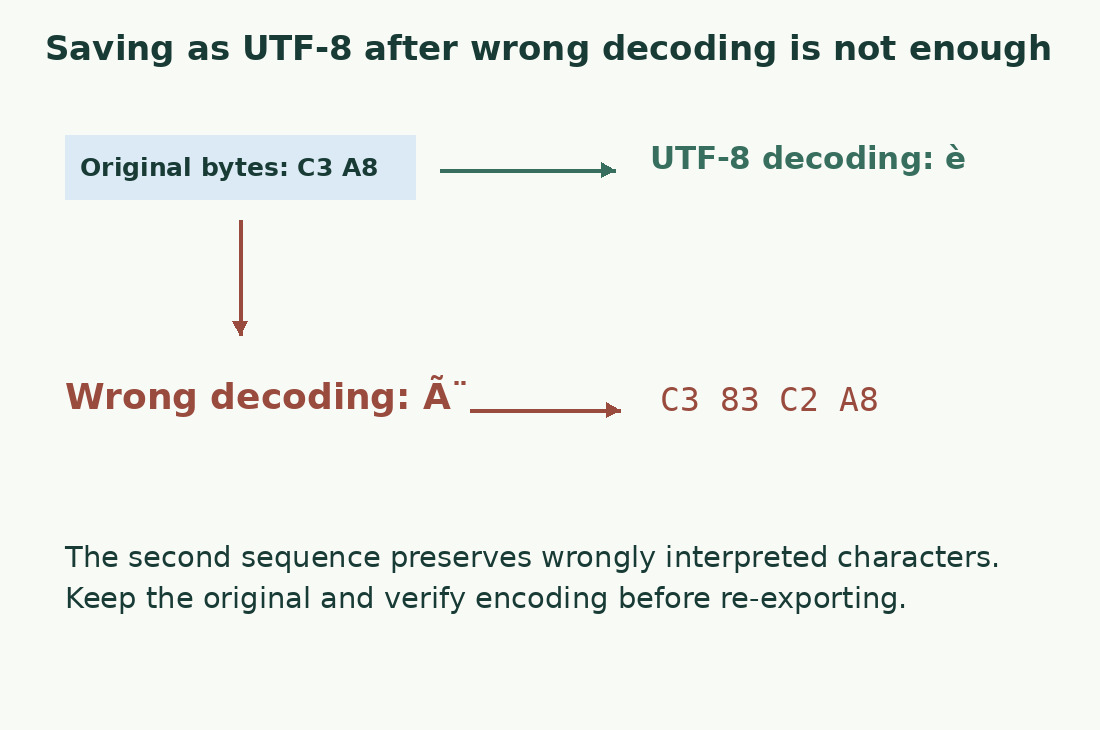
UTF-8 saving does not repair everything
Converting intact bytes differs from saving visible errors. A saved replacement symbol can be valid UTF-8 while preserving wrong content.
Re-export the original where possible. Otherwise compare with a reliable source; manual review may be needed. Repeated substitutions do not prove complete recovery because origins differ and information can be lost. Record repaired and doubtful words, particularly data, quotations and names that cannot be guessed.
Understand the BOM
A BOM is an initial text-stream signal documented by Unicode. It is not an accent or proof of correct content. Readers may hide it; mishandled imports may expose unexpected characters.
Do not add or delete initial elements merely because programs differ. Check recipient format and reader behavior. An editorial service marker is not an author’s word; machine imports may require a particular technical form. These uses require different checks.
Verify in two readers
Reopen the UTF-8 copy elsewhere and compare sample words, first and last lines, paragraphs and tabs. Correct encoding does not ensure complete export or intended separators.
Only then import and save the report. Identical-looking accents that still differ may need NFC/NFD normalization rather than decoding. See characters and UTF-8 bytes for TXT size differences.
State the exchange format
Provide UTF-8, relevant newline convention and exclusions in a brief verifiable note. For automatic imports, ask about separators and empty fields too.
Correct previews do not guarantee the next system uses the same rules. Retain approved output and compare a post-import sample to distinguish export from downstream errors. The counter does not repair or interpret content.
Exchange a small test first
Before exporting an archive, send a nonconfidential test line with literal Italian “caffè”, “perché”, “lunedì”, a space, apostrophe and euro sign. Ask what the recipient sees after import. If altered, repair the transfer first. Character totals alone cannot recognize correct language.
Before repairing accents
| Step | Purpose | Keep |
|---|---|---|
| Duplicate received file | Protect original bytes | Untouched original |
| Identify encoding | Distinguish decoding from damaged text | Sender’s information |
| Export UTF-8 | Specify interpretation | Newly named copy |
| Reopen and compare | Verify conversion | Accents and symbols |
Sources and checks
- MDN: Blob.text() · The browser method decodes content as UTF-8
- Unicode: UTF encodings and BOM · Code points, encoding forms and the byte-order mark
- MDN: TextEncoder · Encoding strings as UTF-8 bytes