Recognise the document structure
Apple distinguishes word-processing documents, with a flowing body, from page-layout documents assembled from text boxes and other objects. A report and a poster therefore need different collection checks. List title, body, captions, table text, final notes and references required by the recipient. Small print is not automatically excluded: editorial purpose and physical position are different things.
Select content rather than its container
Place the insertion point inside the box, shape or table cell and highlight the actual words. A border with resize handles indicates an object selection, not necessarily selected text. Check a recognisable sentence against the same copied sentence. If the result does not describe it, fix selection before diagnosing tokenisation. This verifies your actual material without assuming universal object inclusions.
Create a traceable inventory
Record location, content, required inclusion and checked status. Distinguish absent from unchecked. Give repeated occurrences separate references: a repeated heading may count twice when the requirement covers everything printed, whereas an archive of unique wording answers a different question. The inventory also catches omitted table cells or captions. Location labels help retrieval and must stay outside the measured text.
Choose one aggregation method
Either measure each included part and sum like units, or collect all included text into one verified copy and count that. Match every part to the inventory. Mixing an automatic document total with separately measured boxes risks double counting. If automatic inclusion cannot be established, use the checked collection and declare its scope while preserving the original layout file.
Reconcile a hypothetical five-part total
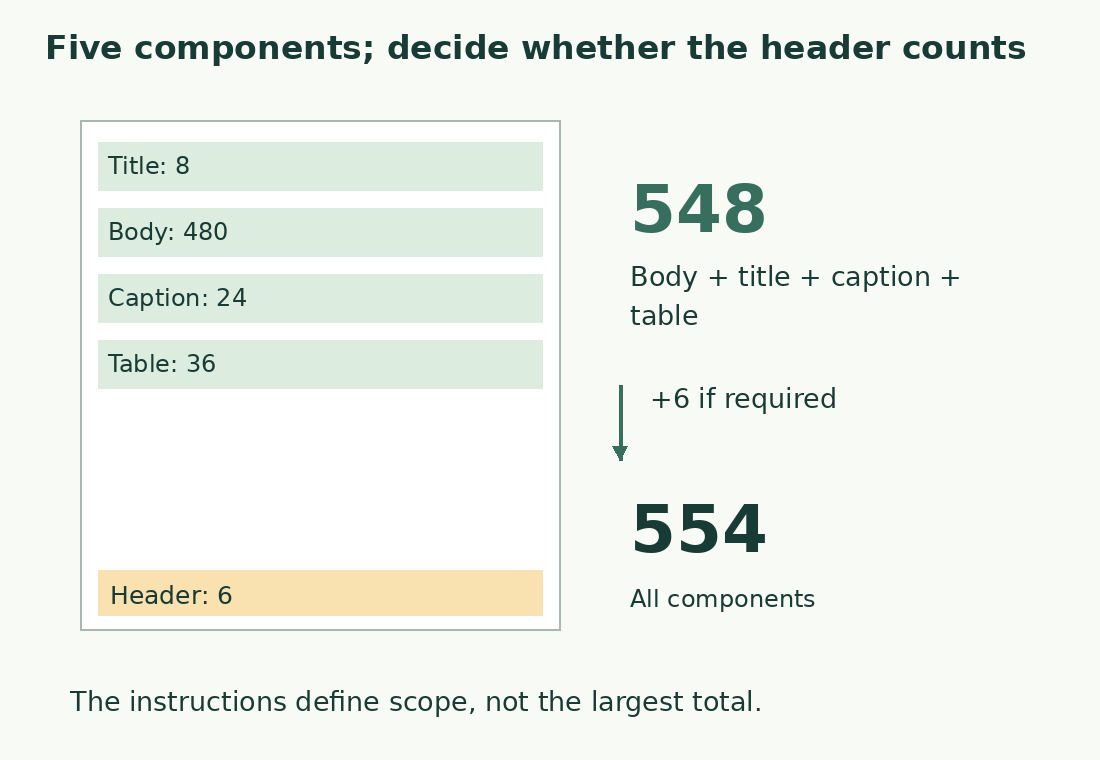
Suppose separately measured components are body 480 words, title 8, caption 24, table 36 and header 6. All included gives 480+8+24+36+6=554; excluding only the header gives 548. These are illustrative values, not Pages test results. If the caption is later excluded, remove its 24 from the appropriate total. Never sum words and characters in one column.
Collect text in a readable order
Use title, body, captions at relevant points and final notes. Insert necessary separators so the last word of one object does not merge with the next. Declare those separators for character measurements. Words embedded in images need checked transcription if included; selectable text and image lettering are different sources. A visual comparison helps find omissions but does not replace the inventory.
Update after layout edits
A shortened heading, added caption or duplicated box can change text during design. Recheck the actual delivery version after these edits. In shared work agree when content is ready for the final count. Replace placeholder text in duplicated objects, while preserving intentional repetitions. A total produced before layout is not automatically current after it; keep each changed component traceable.
Report the method and exclusions
Use the word counter or character counter on the checked collection. The general Pages guide explains the counter controls. State whether the result comes from component sums or one complete collection, its unit and exclusions. Keep the inventory so a disputed total can be checked by component rather than argued as one isolated number.
Hypothetical component inventory
| Part | Separately measured words | Scope |
|---|---|---|
| Body | 480 | Included |
| Title | 8 | Included |
| Caption | 24 | Included |
| Table | 36 | Included |
| Header | 6 | Depends on requirement |
| All parts | 554 | Sum of five components |
| Without header | 548 | 554 − 6 |
Sources and checks
- Apple: Primary documentation · Documented commands, function definitions and limitations used in this guide; workflow examples are original.
- Apple: Primary documentation · Documented commands, function definitions and limitations used in this guide; workflow examples are original.