Count removed characters
With text in A2 and target in B2, use =(LEN(A2)-LEN(SUBSTITUTE(A2,B2,"")))/LEN(B2). SUBSTITUTE removes matches; the length difference is removed characters, divided by characters per target. This arithmetic does not interpret Italian. Google documents substitutions within longer words: casa can match casale. Decide whether you need substrings or standalone words, naming the column “literal occurrences of casa”, rather than “words”.
Check every step of a sample
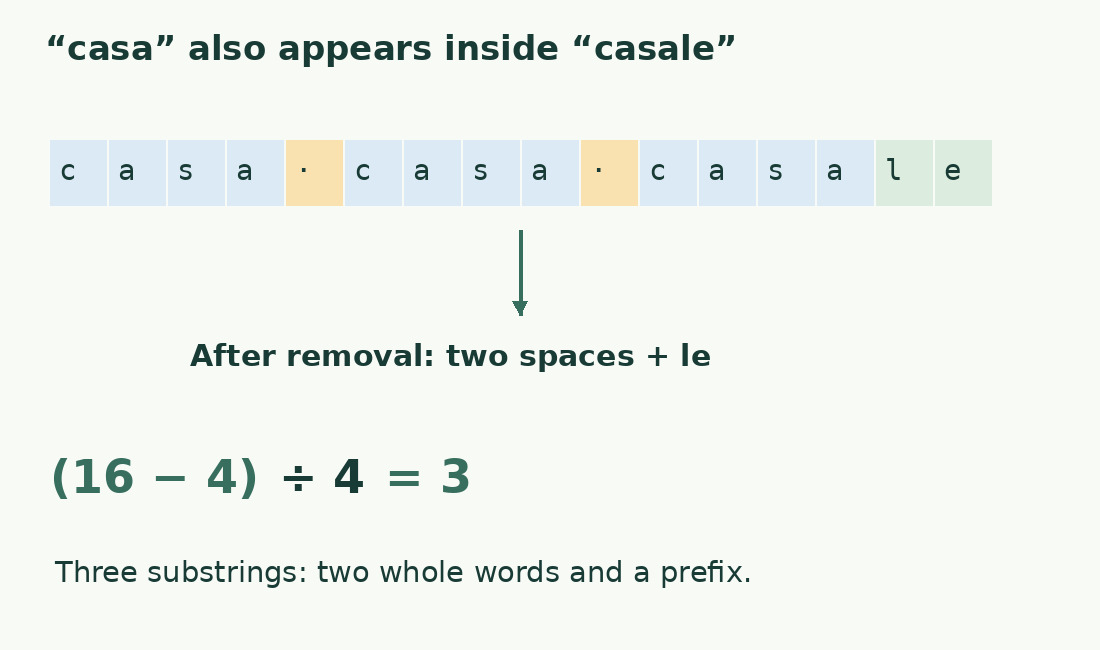
The literal Italian casa casa casale has 16 characters, including two spaces. Removing casa leaves le, four characters: two spaces and “le”. The difference is 12; divided by target length 4, it gives 3 occurrences. Two are complete words and one lies inside casale. Do not subtract one as a fixed correction: real longer words vary. Define word boundaries and another method if needed; literal counting remains useful for exact codes and markers.
Guard against an empty target
An empty B2 has length zero, producing division by zero rather than a meaningful search. Use =IF(B2="","",(LEN(A2)-LEN(SUBSTITUTE(A2,B2,"")))/LEN(B2)). A blank result means no target is defined; a message such as “define target” may be clearer. Do not silently return zero, which could imply a completed search with no matches. A target containing one space is different: it is valid when counting spaces.
Decide case handling
Check literal replacement against the actual spelling. To ignore case, prepare lowercase copies of both text and target, retaining originals, then apply the formula to those copies. Normalization must be symmetric; changing only one side can miss matches. Use Casa casa to compare expectations. Case may matter for codes, variables or abbreviations, so do not remove it automatically. State the transformations used instead of claiming universal case behavior for every formula version.
Understand overlapping matches
In banana, ana starts at the second and fourth letters; the windows share a letter. Nonoverlapping replacement cannot remove both as independent blocks in one pass. Removing three characters gives one occurrence under this method. If all overlapping windows are required, this formula does not meet the task: use an algorithm checking every starting position and an appropriate sample. A definition-dependent difference is not automatically an error; state whether matches may share characters.
Extend to multiple rows
Put the formula in a helper column. When every row uses one target, freeze its reference, such as $B$1, while the text reference changes. Check the second filled row before extending throughout. Summed occurrences and rows with at least one match are distinct: ten appearances in a row contribute ten versus one. Keep both metrics when studying spread and repetition, and do not label the sum people, documents or responses without checking each row’s unit.
Clean without inventing matches
Copied targets may contain a trailing space or a visually similar sign. Check both ends and length; reduce an unexpected zero to a small character comparison. Removing arbitrary marks may create matches that did not exist. Preserve the original target and document transformations: codice-12 must not silently become codice12. Removing a space can merge words. Apply separator cleanup as a controlled rule, not to force a desired result.
Report the metric clearly
For matching cells alone, use COUNTIF. The word counter can complement one passage, but linguistic tokens and literal substrings need not agree. Report text or range, target, case rule and overlaps: “three literal nonoverlapping occurrences of casa, including parts of words”. Keep the worked sample near the formula to detect behavior changes. Function language and argument separators depend on sheet settings.
From sixteen characters to three occurrences
| Step | Value | Meaning |
|---|---|---|
| Original text | casa casa casale | 16 characters |
| After removing casa | Two spaces followed by le | 4 characters |
| Difference | 12 | Characters removed |
| Target length | 4 | Characters in casa |
| Quotient | 3 | Substrings, not only whole words |
Sources and checks
- Google: SUBSTITUTE · Replacement of sequences within longer words.
- Google: LEN · String lengths used in the worked arithmetic.