Choose among three questions
You may want exact category matches, cells containing a sequence or total appearances. A cell containing the literal Italian giallo giallo is one cell, has two occurrences and is not exactly giallo; it contributes zero, one or two depending on the question. Label the metric “cells containing sequence”, rather than the ambiguous “word total”, especially for reports or decisions.
Use exact criteria for controlled categories
=COUNTIF(A2:A20,"giallo") suits one category per row. Google documents case-insensitive matching: it cannot certify identical capitalization in “Giallo” and “giallo”. A low result may reflect extra spaces or a longer description: “giallo chiaro” is not the exact category. Preserve the original when correcting or flagging ambiguous categories. Do not immediately add wildcards, which may admit different meanings.Find a sequence inside a cell
=COUNTIF(A2:A20,"*giallo*") allows text before and after: giallo chiaro, un fiore giallo and giallognolo all qualify. The last contains a substring, not a standalone word. Read a checking subset for short lists. For longer text, define boundaries such as spaces, punctuation, cell edges and apostrophes. Two asterisks do not provide a complete linguistic search.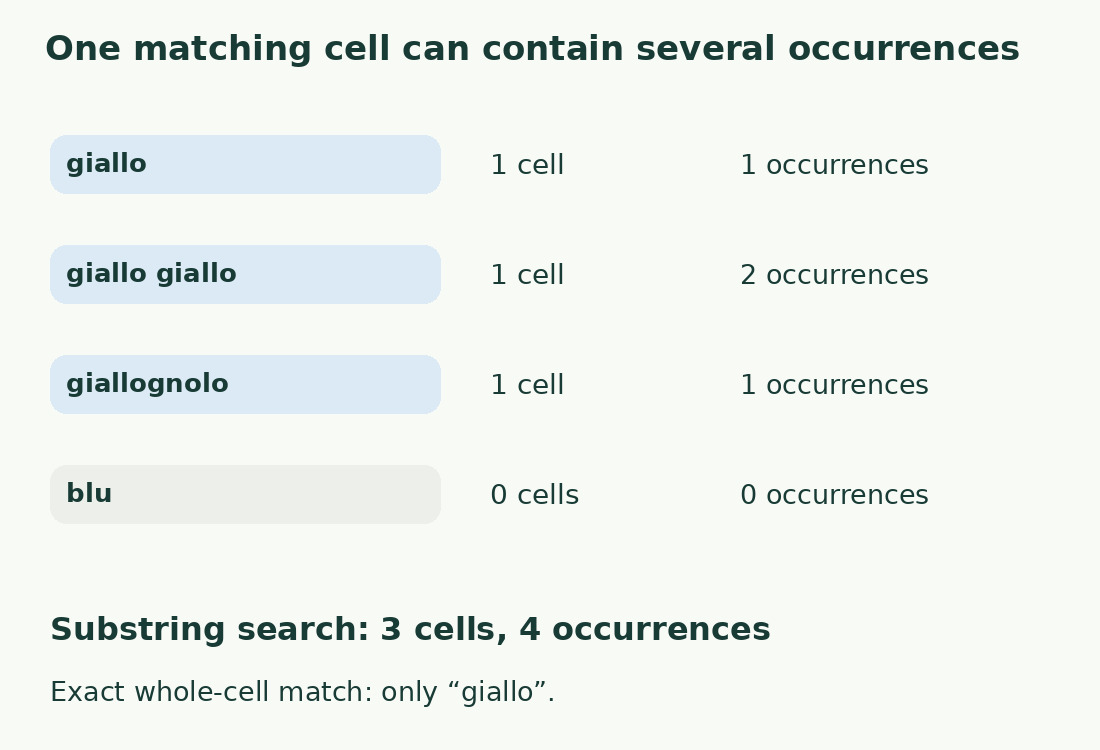
Treat wildcard symbols carefully
In COUNTIF criteria, * represents a sequence and ? one character; Google documents ~ as escape. A literal asterisk therefore needs escaping, for example ~*. Inspect criteria taken from cells or questionnaires for special symbols. Document criterion transformations without altering source data. For technical codes, test both expected matches and expected exclusions: a positive example alone cannot demonstrate correct filtering.
Check one five-cell sample
Use giallo, giallo giallo, giallognolo, blu and an empty cell. Exact matching finds 1 cell; containing the sequence finds 3; literal occurrences total 4: one, two and one in the first three. “Responses mentioning the sequence” can use 3; “sequence repetitions” needs 4. “Preferences for yellow” additionally requires knowing response collection and whether giallognolo belongs to that category. A substring cannot invent reliable semantics.
Check the record population
Exclude headers and sample rows unless intended; include the actual final data row. Keep a stable ID and report analyzed row count alongside matches. If people submitted multiple responses, decide whether the unit is response or person: COUNTIF counts cells, not identities. Undocumented deduplication can remove legitimate answers or retain spelling variants of repeated submissions. Document cleaning separately before making statistical claims; “records” may be the appropriate unit.
Use negative controls too
For exact matching, “giallo” is positive and “giallo chiaro” negative; for sequence matching both are positive and “blu” negative. Add within-cell repetition to verify that its contribution remains one. If space cleanup changes results, record the transformation and identify the new data version rather than attributing it to raw input. Apply cell cleanup in a helper column to preserve comparison and recovery.
Change method when the question changes
Use length-difference occurrence counting for every appearance, LEN for text length, or a consistent tokenizer for terms in one passage. The word counter examines content but does not replace record counts. Report criterion, range and unit: “3 of 5 cells contain giallo” is reproducible; “giallo: 3” leaves essential choices unexplained. Function language and argument separators follow sheet settings.
One sample, three questions
| Cell | Exact match | Contains sequence / occurrences |
|---|---|---|
| giallo | 1 | 1 cell / 1 occurrence |
| giallo giallo | 0 | 1 cell / 2 occurrences |
| giallognolo | 0 | 1 cell / 1 occurrence |
| blu | 0 | 0 / 0 |
| Empty | 0 | 0 / 0 |
| Total | 1 | 3 cells / 4 occurrences |
Sources and checks
- Google: COUNTIF · Cell counting, text criteria, wildcards, escaping and case-insensitive comparison.