Describe the symptom
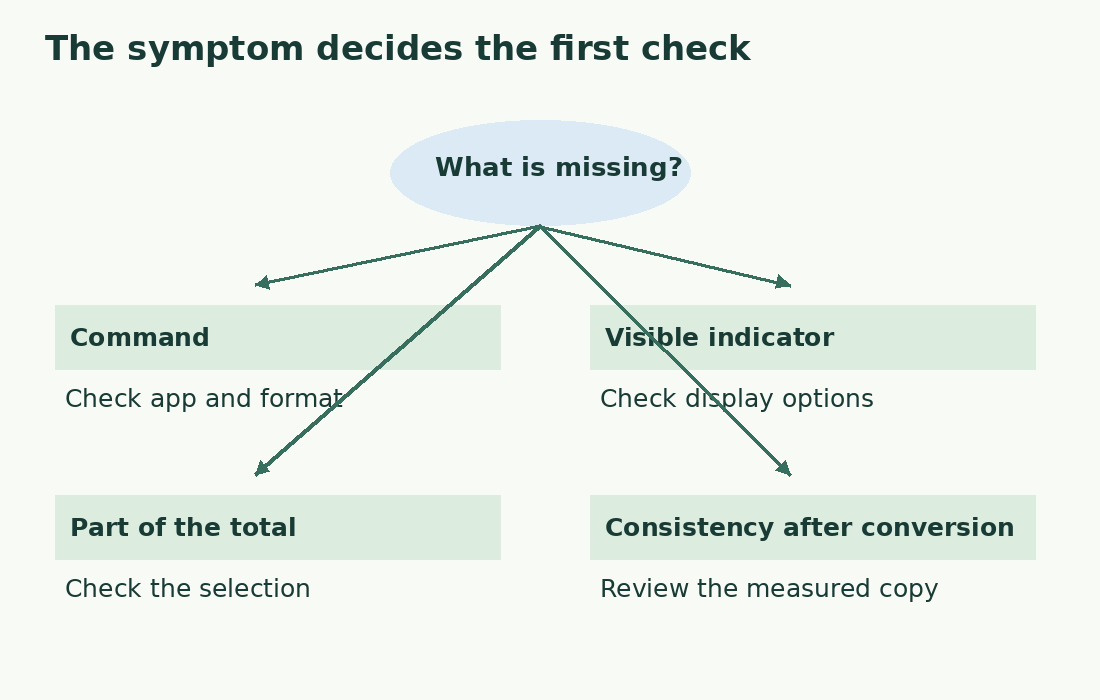
Distinguish a missing menu command, a missing live indicator and a visible but unexpected number. Check app and format for the first, the display option for the second, and selection, version and unit for the third. Record application, device and extension: a browser file is not necessarily a native Google document, and its appearance does not identify its editor. This avoids unnecessary conversions.
Check the app and Office mode
Google lists Sheets, Slides and Office Compatibility Mode as environments without word count. A missing command there does not establish file corruption. Spreadsheet text needs formulas; slide text needs a defined collection scope. For Office files, distinguish editing the original format from a converted copy using editor information as well as filename. Renaming an extension does not convert content. Measuring two paragraphs may need only an extract.
Convert only when a Google copy is useful
Google supports Office editing and copies in Google formats. Keep the original and name the copy clearly; do not overwrite your only complex document for a statistic. Compare first and last paragraphs, headings, tables, notes, captioned images and object text. Check that material to be measured survived, without claiming perfect technical identity. If something changed, return to the original and reconstruct only the necessary text. Record which version was counted.
Separate the dialog from the live indicator
Access to the count dialog does not mean the live indicator is enabled; see the Google Docs counting guide. Use this distinction when seeking help. A small number can reflect a selected word or title. A large one can reflect the wrong metric or version. An added sentence or included heading can explain a remembered difference. A retained sample is more reliable than memory.
Measure a controlled extract
For an abstract, biography or description, copy only relevant text into the character counter or word counter. Check first and last words, omit working labels and avoid duplicating a title from body and header. The literal Italian Lago blu has four letters, a space and three letters: eight characters. A period makes nine, still two space-separated words. This tests arithmetic, not completeness of notes, tables or objects; inventory those separately.
Coordinate shared documents
Distinguish reading from editing permission. Counting alone does not automatically require broader privileges or unagreed copies. State exactly what you could inspect, such as body text but not attachments. Agree on a reference version: collaborators’ edits can immediately invalidate a number. Identify a checking copy’s source and keep it from being mistaken for the editable master. The final count follows the last approved revision.
Choose an alternative by content structure
For descriptions in spreadsheet rows, a length column identifies overlong records better than a grand total. Slides require visible text, speaker notes and repetitions to be separated. Prose often suits the editor or a complete text copy. Follow Sheets character formulas or the slide collection method as appropriate. Choose by content and recipient’s rule; an add-on is not automatically necessary.
Prepare a reproducible help request
If a native Google document still lacks the command, report environment, exact steps, whether all documents or one are affected, and what appears instead. Use a short nonconfidential sample. Describe the observed symptom, not an unproven “broken counter”, and list completed checks. If an alternative produced a number, record its unit and extract scope; that measurement does not demonstrate that the original interface works. Reduce variables and retain enough material for later checking.
The first check depends on the symptom
| Symptom | Priority check | Useful outcome |
|---|---|---|
| Command absent | App and file mode | Choose editor, formula or extract |
| Number not always visible | Live count indicator | Distinguish display and availability |
| Number too small | Active selection | Identify a partial count |
| Difference after conversion | Content inventory | Check the copy actually measured |
Sources and checks
- Google: word count availability · Unavailable in Sheets, Slides and Office Compatibility Mode.
- Google: working with Microsoft Office files · Editing Office files versus saving Google-format copies.