Define the presentation’s scope
Visible text and the speaker’s working script can differ greatly. A 500-word limit for projected content does not automatically include personal notes; counting slides alone understates a transcript. Write the scope first. Keep repeated section titles when measuring what the audience encounters. Counting unique concepts or strings is a different task, so do not remove repetitions simply to reduce the total.
Understand the application’s limitation
Google officially lists Slides as lacking word count. This is a controlled collection method, not a hidden native command. It assumes neither that an export preserves every item nor that an unknown script is safe. Collection makes a number explainable but requires completeness checks: small captions, chart labels and references are easy to miss. Large jobs may justify separately verified automation; unchecked automation can duplicate objects or omit embedded text.
Inventory every slide
Create working columns for slide number, title, text elements, notes and checked status. These labels do not count. Inspect titles, subtitles, lists, captions, shape text, table rows and references. If writing inside an image belongs in the assignment, transcribe and check it. Mark absent elements explicitly, distinguishing a deliberately text-free slide from one not checked. Identical objects may be intentional; record them without deleting the original.
Transfer text without working labels
Use one block per slide in a helper document, keeping reference headings outside the counted selection or in separate table columns. Check the first and last word of every transferred object. Preserve boundaries: the literal Italian title Acqua and subtitle in città can become Acqua in città, not Acquain città. Declare spaces or line breaks between objects for character counts; word counts also need separators to avoid creating new words. Count only the collected content.
Keep speaker notes separate
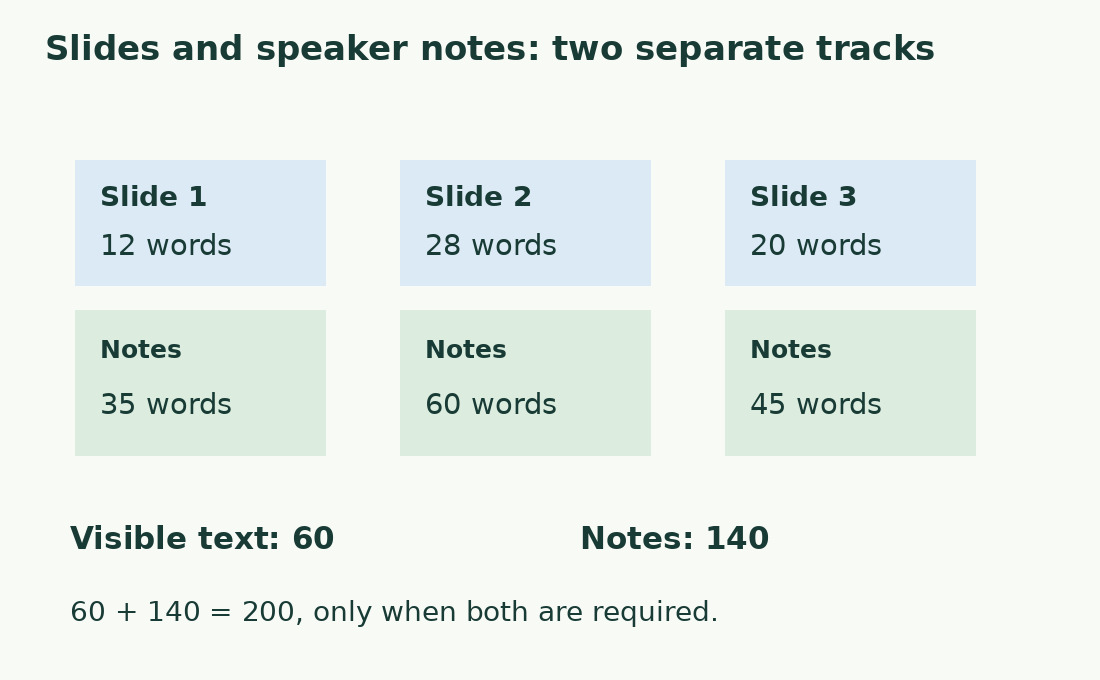
Notes may repeat a title, add an example or contain instructions such as “pause”. For a spoken-script estimate, select what will actually be spoken. For delivery of complete notes, preserve them and label the scope consistently. Report visible words and note words separately; combine only when both are required. Duration also depends on pace, pauses and demonstrations, especially when notes are shorthand rather than a script.
Work through three slides
For hypothetical slides, visible words are 12, 28 and 20; notes are 35, 60 and 45. Thus 12 + 28 + 20 = 60 visible words and 35 + 60 + 45 = 140 note words, combined 200 only when required. If a four-word title appears in slides one and three, 60 correctly includes both. Removing one occurrence gives 56 unique-string words, answering a different question. Scope and repetition need explicit decisions.
Use per-slide counts to improve readability
Two 300-word presentations might spread text evenly over ten slides or overload one slide. Retain counts by slide; there is no universal threshold for quotations, technical data and instructions. Separate the main message, necessary detail and spoken explanation. Move detail to notes or an accessible attachment when appropriate, without removing essential units or percentage bases. Update both slide and note counts after moving text.
Check the final collection
Compare the inventory against every slide in the delivered version: new slides, notes and changed titles invalidate earlier totals. Use the word counter or character counter and record version, scope and repetition policy. Follow any recipient-supplied method, keeping your inventory as a completeness check. Prefer “60 visible words in three slides; 140 note words counted separately” to a vague “about 200”.
Visible text and notes: three hypothetical slides
| Slide | Visible words | Note words |
|---|---|---|
| 1 | 12 | 35 |
| 2 | 28 | 60 |
| 3 | 20 | 45 |
| Separate totals | 60 | 140 |
| Combine only if required | 200 | Visible text plus notes |
Sources and checks
- Google: word count availability · Word count is unavailable in Google Slides.