One visible symbol can contain several components
A visible emoji is not a sufficient definition of a character. Similar-looking strings can have different underlying components. Compare Excel with another counter only after naming the units each counts. Preserve the original sample rather than selecting the emoji again from a keyboard; that can create a different sequence and obscure the discrepancy you intended to investigate.
Check the workbook’s compatibility setting
Compatibility is a workbook setting, not something established merely by seeing Microsoft 365. Current Channel new workbooks use Version 2 as of April 2026; older workbooks and other channels may differ. Excel 2024 and earlier support at most Version 1. Where available, use Formulas > Calculation Options > Compatibility Version. Keep a copy before changing calculations and inspect length-dependent formulas.
Use samples with a simple control
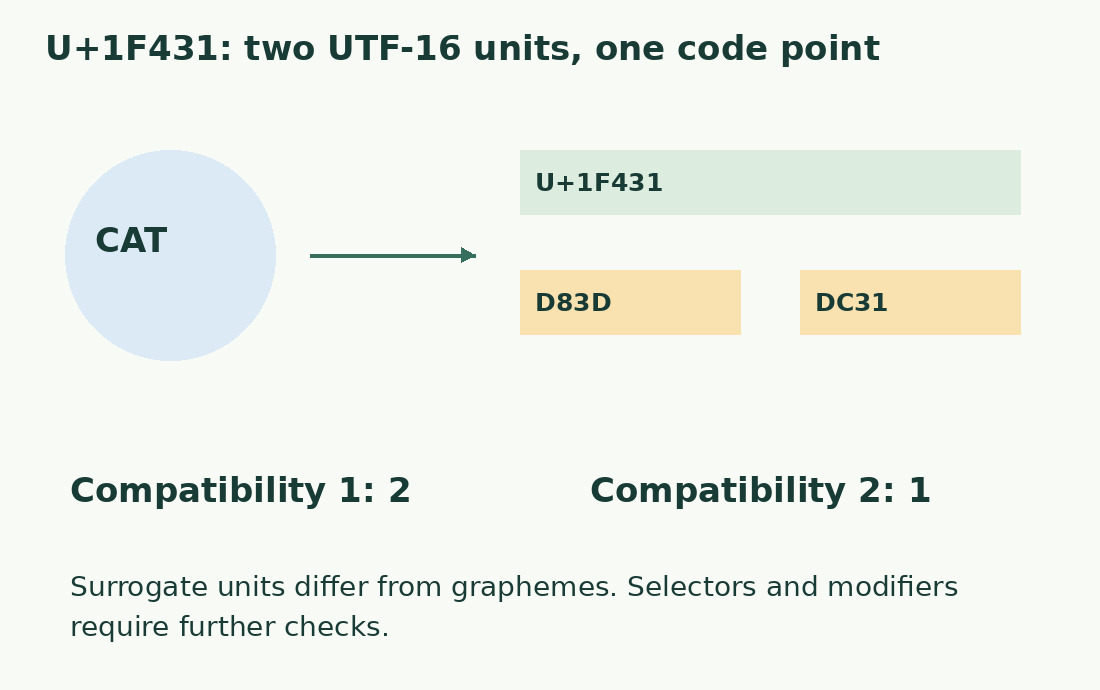
The literal 🐱, U+1F431, contributes two UTF-16 units under Version 1 and one under Version 2. 🐱! therefore gives expected lengths three and two. Apply =LEN(A2) to each correct row and record actual observations. The ordinary control gatto! has six characters. If it differs too, first inspect extra spaces and references rather than blaming Unicode compatibility.
Selectors and modifiers remain distinct
✈️ contains an airplane plus variation selector, giving two in both versions. 👍🏽 has a supplementary base and skin-tone modifier: expected length four in Version 1 and two in Version 2. These values follow the explicit components and documented rules, not manual testing in every Excel release. Version 2’s surrogate handling does not promise grapheme-cluster counting.
A shared threshold needs a shared unit
Two people checking a 20-character threshold can disagree under different settings. Establish which method the destination requires and test a sample in its actual field before preparing many records. It may count UTF-16 units, code points or visual clusters. Use the character counter only with its metric definition. Retain differently labeled results when methods differ; a fixed correction per emoji is unreliable.
Do not cut through composed sequences
Do not remove an invisible selector or modifier merely to shorten a string; it can change appearance or meaning. Prefer revising the whole description, or replacing an emoji with a clear word where appropriate. Avoid slicing in the middle of a composed sequence. Compatibility changes also concern functions such as MID, FIND, SEARCH and REPLACE, so inspect extraction behavior as well as the final LEN total.
Record a reproducible discrepancy
A useful report contains exact nonconfidential sample, formula, result, workbook compatibility and comparison method. Preserve both observations if another environment differs; do not overwrite the only original while investigating. For ordinary text start with Excel LEN. For symbols at a strict boundary, record the method and full string instead of altering text until unrelated counters happen to agree.
Expected lengths from explicit components
| String | Version 1 | Version 2 |
|---|---|---|
| 🐱 | 2 | 1 |
| 🐱! | 3 | 2 |
| ✈️ (airplane + selector) | 2 | 2 |
| 👍🏽 (base + modifier) | 4 | 2 |
Sources and checks
- Microsoft: Compatibility Versions · Workbook setting, channel availability and surrogate-pair handling.
- Microsoft: LEN · Text length, spaces and compatibility-specific Unicode behavior.