Separate display, storage and import problems
A cell can hold complete text while displaying only part, exceed its available capacity, or receive text that an earlier step already shortened. These situations need different remedies. Do not diagnose them from the visible row alone.
Keep the original source and imported workbook. Put =LEN(A2) beside the imported value, then compare a source count made under the same rule. Inspect the beginning, middle and end as well. Equal lengths are useful evidence, but different texts can have the same length. Never overwrite the only complete source while investigating.
Cell capacity is different from column width
Microsoft lists 32,767 characters and 253 line feeds per cell. Its formula-content limit is a separate 8,192 characters. A paragraph-heavy value can therefore require a line-feed check as well as a total-length check. Column width concerns presentation, not these capacities.
An ordinary-letter sample of 32,768 is one above the stated cell limit. This identifies a boundary without predicting how every import path reports failure. Examine the actual imported result. A warning about a long formula concerns a different object from a long plain-text value or its displayed width.
When the text exists but is hard to read
If the cell still contains the expected final passage and matches the source, adjust column width, row height and text wrapping for reading. A very long cell may remain an awkward review surface even when the content is intact. Decide whether the sheet is a document store or merely an index linking to the complete text.
A preview is acceptable only when the workflow calls for one and labels it accordingly. It cannot satisfy a requirement to store the full document. Initial, middle and final samples offer a quick check; a systematic completeness check requires comparing the whole text.
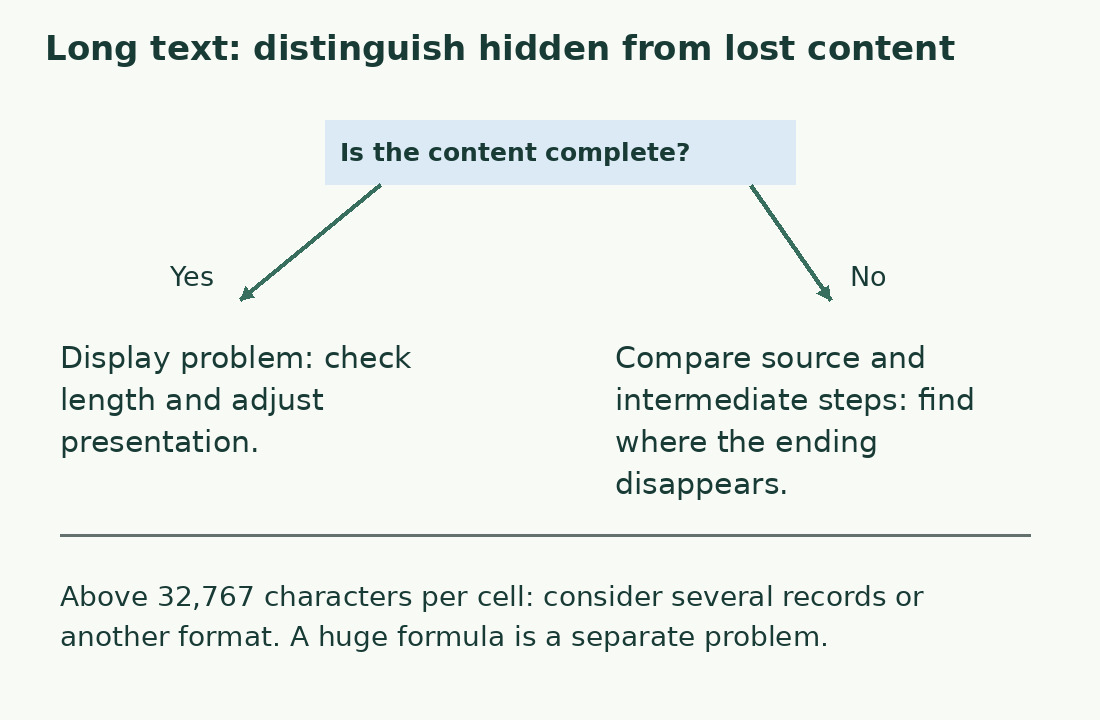
Find the step that removed the ending
When the imported value is shorter and its ending is absent, compare the original export, intermediate file and destination cell using an identifiable, nonconfidential record. The problem may precede Excel. Look for deliberate clipping, a smaller source field or an exporter configured to supply a summary.
A much lower cutoff is not explained automatically by the 32,767 limit. Repair the transformation that loses content, then reimport from the complete source. Manually appending a missing ending to one row can leave the faulty process active for future data. Preserve record IDs and order during the new comparison.
Split long content with a reconstruction plan
One option is several records sharing a document ID and explicit sequence number. Prefer paragraph or section boundaries when possible. An ordinary 40,000-character text might fit two 20,000-character blocks, but equal summed lengths do not prove that nothing was duplicated or omitted.
Specify how separators are stored. Adding a newline between previously contiguous blocks introduces content; removing the original separator can join words. Reconstruct the complete text, check ordering and boundaries, and compare it with the source before accepting the split. Keep this reconstruction rule with the data.
Measure the formula separately from its result
Large formulas containing many literal strings can become hard to diagnose before their final text is usable. Keep data separate from logic and divide transformations into named helper steps. This makes references and intermediate losses easier to inspect; it does not expand the destination cell.
If the deliverable is a long document, a document format may suit reading and updating better than fragments scattered across a sheet. Use the workbook as an index when that matches the real process, rather than forcing every article into cells because the first available file happened to be a spreadsheet.
Check the actual export and future updates
Inspect the file that will actually be used: record count, IDs, block order and full content. Character totals flag anomalies but cannot replace a text comparison where completeness is essential. For one passage the character counter offers another measurement, provided you read its newline and Unicode conventions.
For split data retain the block inventory and transformation history. Record why the split exists and how to update one block without breaking its relationship to the others. The remedy is complete when the text can be recovered, read and revised without loss, not merely when an error message disappears.
Choose the check before the remedy
| Signal | Check | Possible action |
|---|---|---|
| Text not fully visible | Does actual content match the source? | Adjust display if complete |
| Ending missing | Compare source and intermediate files | Repair the truncating step |
| Above 32,767 characters | Keep the complete external source | Use structured records or another format |
| Very large formula | Inspect formula as well as result | Separate data and transformations |
Sources and checks
- Microsoft: Excel specifications and limits · Distinct cell, line-feed and formula limits.
- Microsoft: LEN · Text length, spaces and compatibility-specific Unicode behavior.