Separate frequency from matching cells
A cell containing a target once and a cell containing it five times both contribute one to a matching-cell total. Occurrence counting asks how often the sequence appears inside the text. Choose the question first. If you want repetitions of a standalone word, a substring calculation needs additional boundary rules; the same letters can also appear within a longer word.
Build an observable calculation
This example assumes a plain-text target such as la. Numbers also accepts wildcard and REGEX searches. Handle *, ? and ~ explicitly; Apple documents tilde escaping for literal wildcard symbols. The length-difference calculation must not divide variable-length pattern matches by the written pattern’s length. Keep an unescaped target separately if preparing an escaped search copy.
Put source text in A2 and the target in B2. Compare =LEN(A2) with =LEN(SUBSTITUTE(A2,B2,"")), then divide their difference by =LEN(B2). Removing each nonoverlapping target removes its length. Keep helper cells visible while checking. Apple documents LEN in graphemes; preserve simple control examples and check complex Unicode requirements separately rather than assuming equivalence to every external counter.
Check the exact Italian example
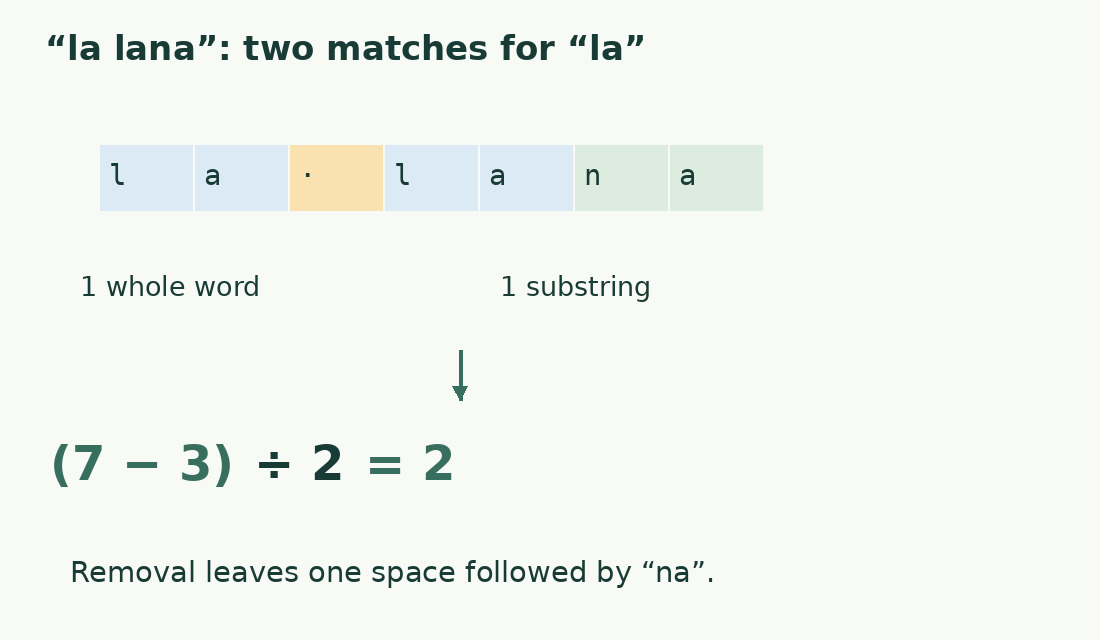
In la lana, the original length is 7 and target la has length 2. Removing both nonoverlapping matches leaves one space followed by na, length 3. (7-3)/2 gives 2. One match is a standalone word and the other a prefix of lana. The result is correct for literal sequences; it is not a count of only the Italian article.
Show an undefined empty target
Do not divide by the length of an empty target. With source and target in A2 and B2, an English formula can be =IF(B2="","Choose a target",(LEN(A2)-LEN(SUBSTITUTE(A2,B2,"")))/LEN(B2)). Adapt function names and separators to settings. An undefined search is not the same as a valid target with zero matches; keep those states visibly different.
Define case and spelling rules
Decide whether case differences count, and preserve the original spelling. If a case-insensitive comparison is required, prepare both source and target using the same documented case transformation, then measure those prepared strings. Do not lowercase only one side or silently normalize accents. Proper names and technical identifiers can contain meaningful distinctions. Record the transformation so a future reviewer can reproduce the comparison.
Recognise nonoverlapping matches
In aaa, the target aa has two overlapping starting positions, but replacement removes one nonoverlapping match. The length-difference method therefore gives 1. It is unsuitable when overlapping starts are required. Do not adjust the result by a fixed constant: other inputs have different overlaps. State the limitation beside the result, particularly when analysing codes rather than ordinary prose.
Aggregate rows while preserving context
Calculate each record separately, keep its ID and sum the results across the intended range. Exclude headings and helper examples. Check the actual final row when data is added. A high total can come from a few repeated records or many different ones; retain row results to tell these apart. Never add a matching-cell total to an occurrence total.
Interpret the result in context
Read the matched passages before rewriting. Repeated technical terms, names and safety instructions may be necessary. Occurrence counts do not prescribe an ideal keyword density. Use the frequency tool for an explicitly documented prose comparison, or the Numbers length guide for a character limit. Preserve the search target, scope and matching convention with the final total.
Literal search: la in la lana
| Step | Value | Meaning |
|---|---|---|
| Original | la lana | 7 ordinary characters |
| Target | la | 2 characters |
| After removal | space + na | 3 characters |
| Difference | 4 | Characters removed |
| Count | 2 | One whole word and one prefix |
Sources and checks
- Apple: Primary documentation · Documented commands, function definitions and limitations used in this guide; workflow examples are original.
- Apple: search conditions, wildcards and patterns · Pattern handling and escaping; the guide’s worked calculation uses plain la.
- Apple: search conditions, wildcards and patterns · Pattern handling and escaping; the guide’s worked calculation uses plain la.