Open the full statistics box
LibreOffice documents Tools > Word Count; the tabbed interface also offers the command under Review. Opening the box makes the labels clear. Before recording a total, check whether text remains selected from editing a heading. Label the result “document” or “selection”, and report the statistic the assignment needs rather than collecting every available number.
Choose the requested unit
Use words for a word limit and the appropriate character figure for a character limit. Average word length cannot convert an actual submission accurately. Pages also change with font, margins and line spacing. An Italian cartella needs an agreed character size and space rule: the Italian cartelle calculator applies that convention, not the recipient’s decision.
Check both ends of a selection
For an abstract or biography, select only the deliverable and inspect its first and last characters. Decide whether its heading belongs before measuring. Keep alternative drafts outside the final selection. For long extracts, record recognisable boundary text rather than relying on page appearance. Inventory notes, captions and object text separately when the instructions require them; the counter cannot determine the submission’s editorial scope.
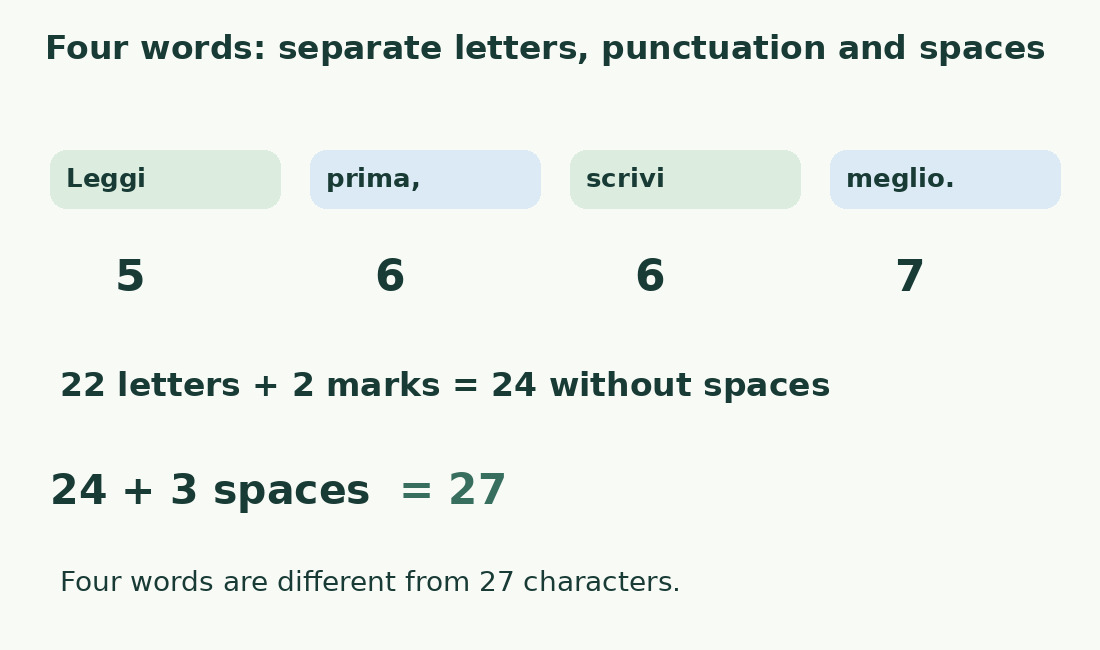
Check an exact character breakdown
Keep the literal Italian sample Leggi prima, scrivi meglio.. Its four space-separated units contain 22 letters, a comma and a period, plus three ordinary spaces: 24 characters without those spaces and 27 with them. This is arithmetic on the exact string, not a claim of testing every linguistic rule in Writer. Unexpected results warrant checking copied punctuation, trailing spaces and selection boundaries first.
Use document statistics as a cross-check
File > Properties > Statistics provides further document statistics. Compare that whole-file information with another whole-file result, not a selected abstract. In collaborative work, first agree on the saved version. Check the ending and a recently revised passage, because two people can correctly count different drafts. Update the record after final notes and other required additions.
Explain differences between counters
Align unit, saved text and selection before investigating tokenisation. The Writer discrepancy guide covers hyphens, slashes and additional separators. Do not change punctuation or settings merely to obtain the smallest total. A mandated method governs acceptance; otherwise document the chosen criterion and retain a small sample explaining the difference.
Shorten the text without losing conditions
When over the limit, remove repeated ideas before necessary conditions. Compare complete revised sentences: the reader still needs actor, action, timing and exceptions. Do not erase required spaces or invent obscure abbreviations simply to save positions. A much shorter brief may require redistributing information between heading, summary and body. Reread in context and recount after each substantial change.
Save a reproducible count
Record file version, unit, included parts and exact value: “1,850 words; title and body included; bibliography excluded” is repeatable. If pasting into a form, check the final field too. The word counter and character counter can help compare the same extract. The documented routes and arithmetic here still need checking in your installed version; no native-app test is claimed.
The exact sample Leggi prima, scrivi meglio.
| Part | Quantity | Contribution |
|---|---|---|
| Letters | 22 | Leggi 5; prima 5; scrivi 6; meglio 6 |
| Punctuation | 2 | Comma and period |
| Ordinary spaces | 3 | Between four units |
| Without ordinary spaces | 24 | Letters and punctuation |
| With spaces | 27 | Complete string |
Sources and checks
- LibreOffice: Word count · Read document and selection statistics in Writer, distinguish spaces and pages, and record a reproducible submission count.
- LibreOffice: Word count · Read document and selection statistics in Writer, distinguish spaces and pages, and record a reproducible submission count.